Master and Sub Accounts
What Is a Master Account
A Master Account is the primary account within an organization’s structure. It serves as the central billing and plan management entity.
- Responsible for billing and invoices.
- Chooses and maintains the subscription plan.
- Oversees one or more Sub Accounts.
In short, the Master Account owns the subscription and controls how the organization uses the product .
What Is a Sub Account
A Sub Account is an additional account associated with a Master Account.
- Created under the Master Account.
- Shares the Master’s subscription plan.
- Has independent access, users, data, and settings.
- Does not manage billing.
Sub Accounts allow teams or business units to operate separately while still using the same overall plan.
How Master and Sub Accounts Work Together
Shared Subscription
Sub Accounts do not have their own plans — they inherit the plan from the Master Account. This means:
- All Sub Accounts operate under the limits of the Master’s plan.
- Usage from all Sub Accounts is counted within the Master Account’s subscription plan and contributes toward the plan’s overall limits and quotas.
- The Master pays for and controls upgrades/downgrades.
Billing and Invoices
Only the Master Account receives:
- Monthly or annual invoices.
- Billing notifications.
- Can view the payment history.
- Can update payment details.
Sub Accounts do not receive billing information.
Why Use Sub Accounts?
Sub Accounts provide organizational flexibility without needing separate paid plans. They are useful when:
- You want to separate teams or brands under the same company.
- Different departments or stores need independent workspaces.
- You have multiple regions, partners, or product lines.
- You want centralized billing with decentralized operations.
- You want each account to maintain its own separate settings, configurations, users, and operational preferences while still sharing the same subscription plan.
Usage Control
- Sub Account users operate independently and have access only to the usage and data within their own Sub Account. They cannot view usage from other Sub Accounts.
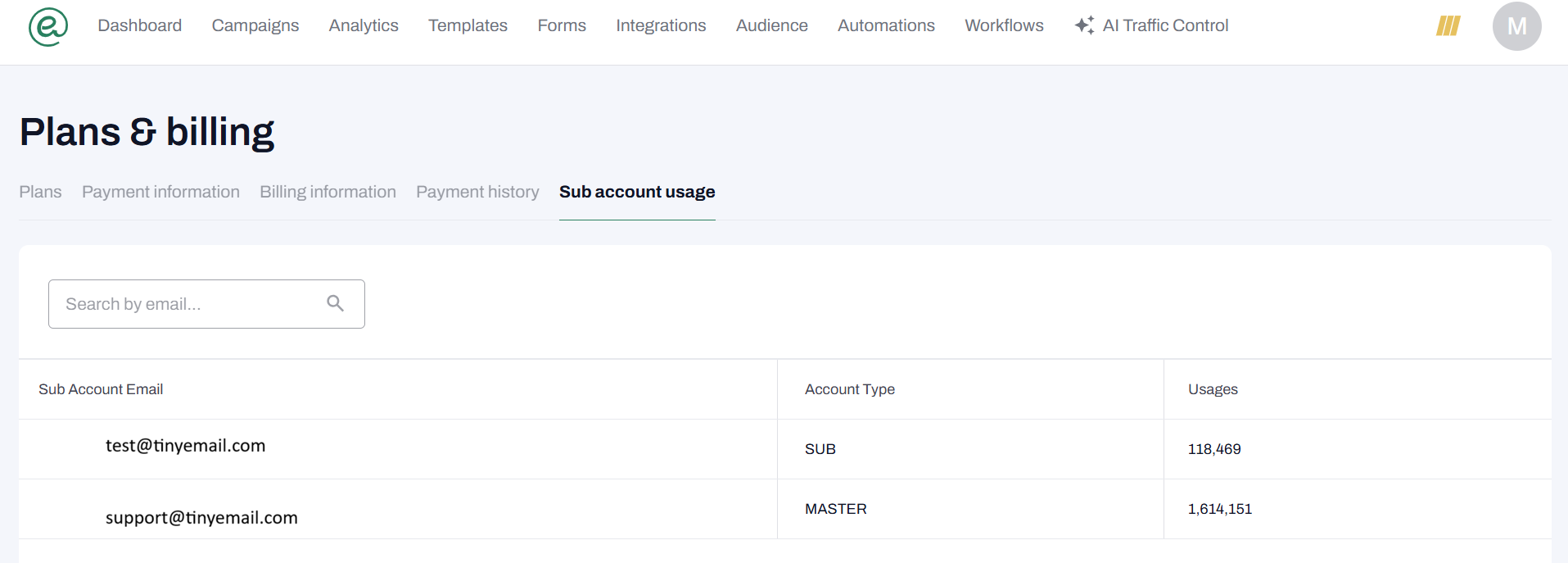
- The Master Account has visibility across all Sub Accounts. It reflects the total combined usage from the Master Account and all associated Sub Accounts under the shared subscription plan.
To view usage for all Sub Accounts
1. Login to your tinyEmail Master account.
2. Click on your profile icon and go to Plans & billing.
2. Click on your profile icon and go to Plans & billing.
3. Navigate to the Sub account usage tab.